How to transfer your Marvel's Spider-Man PS4 save to Spider-Man Remastered on PC
Step by step: copy your Marvel's Spider-Man save from the PS4 to a USB drive, decrypt it with Save Wizard and carry on in Spider-Man Remastered on PC.
Key facts
- Marvel's Spider-Man Remastered on PC reads the saves of the original PS4 game once they are decrypted.
- Copy the saves to a USB drive from the PS4 menu, export each one with Save Wizard for PS4 MAX and rename them to the PC names:
slot0-s.save,slot0-s-manual-0.saveand so on. - Drop them into
Documents\Marvel's Spider-Man Remastered\<your Steam ID>\, replacing the ones the game created. - Save Wizard is a paid program; it is the only step that costs money. Nothing on the PS4 is modified.
- Only saves from the PS4 game work, not from Spider-Man Remastered on PS5. Time needed: about 20 minutes.
- Original platform
- PlayStation 4 (2018)
- Platforms
- Windows
Marvel’s Spider-Man came out on PS4 in 2018 and reached PC in 2022 as Marvel’s Spider-Man Remastered. The PC version can load the saves of the original PS4 game, so you don’t have to swing through New York from scratch again: you only need to decrypt the saves, give them the names the PC version expects and copy them to its folder.
As with other PS4 games, decrypting the saves needs Save Wizard for PS4 MAX, a paid program. Everything else is free and nothing on the console is modified.
Step 1: copy the saves to a USB drive on the PS4
- Plug the USB drive into the PS4.
- Go to Settings → Application Saved Data Management → Saved Data in System Storage → Copy to USB Storage Device.
- Choose Marvel’s Spider-Man, select all its saves and copy them.
The PS4 creates a PS4\SAVEDATA folder on the drive. Don’t rename or move anything inside it.
Step 2: find your saves in Save Wizard
- Plug the USB drive into the PC and open Save Wizard for PS4 MAX.
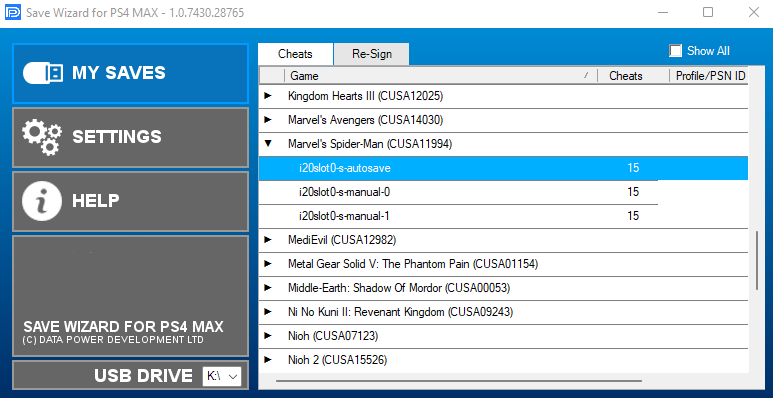
- On My Saves it detects the PS4 saves on the drive by itself. If it doesn’t, pick the drive letter in USB DRIVE, at the bottom left.
- Expand Marvel’s Spider-Man in the list. You’ll see the autosave (
i20slot0-s-autosave) and one entry per manual save (i20slot0-s-manual-0,i20slot0-s-manual-1…).
Step 3: export each save
Repeat this for every save in the list, starting with the autosave:
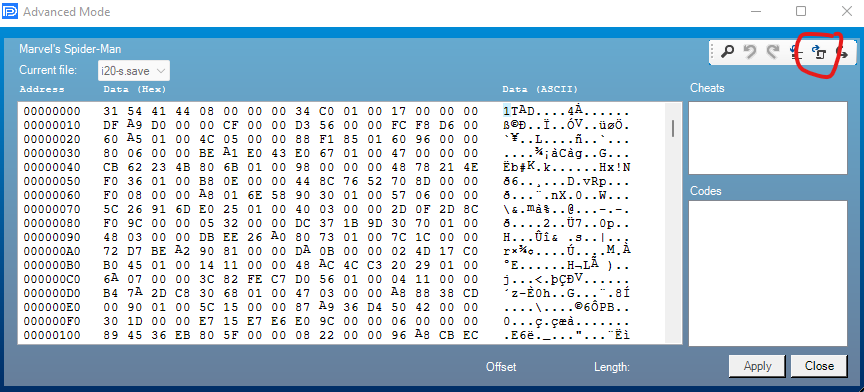
- Right-click the save and choose Advanced Mode. Decrypting it can take a moment.
- In the window that opens, click the export icon at the top right (circled in red) and save the file in a folder of its own, such as
Desktop\Spider-Man. - Close the window and go on with the next save.
Step 4: give the files the PC names
The PC version expects these names, in the same order as the saves on the PS4:
| Save on the PS4 | Name on PC |
|---|---|
i20slot0-s-autosave |
slot0-s.save |
i20slot0-s-manual-0 |
slot0-s-manual-0.save |
i20slot0-s-manual-1 |
slot0-s-manual-1.save |
i20slot0-s-manual-2 |
slot0-s-manual-2.save |
If Windows hides extensions, turn on View → File name extensions in File Explorer first, so that the files don’t end up called slot0-s.save.save.
Step 5: copy them to the PC version
- If you have never started Spider-Man Remastered on PC, start it once, begin a New Game and close it, so the save folder exists.
- Open this folder (the last one is your 64-bit Steam ID, a long number):
%USERPROFILE%\Documents\Marvel's Spider-Man Remastered\<your Steam ID>\- Make a copy of the folder’s contents somewhere else, just in case.
- Drag your renamed files into it and replace the files with the same name.
Start the game and load your save: your PS4 progress carries on in the Remastered version.
If something goes wrong
- The game doesn’t show your saves: check the names against the table above, that they end in
.saveand not.save.save, and that they’re in the folder with your Steam ID. - The game’s own saves come back: Steam Cloud restored them. Start the game again and, if Steam warns about a conflict, keep the files on this computer.
- Save Wizard doesn’t find the saves: copy them again from the PS4 with Copy to USB Storage Device and don’t change the
PS4\SAVEDATAfolder. - The saves are from the PS5 version: they can’t be transferred with this method.
Good to know
- Save Wizard is a third-party commercial product, not affiliated with Insomniac Games, Nixxes or Sony. Check its website for the current price and compatibility list.
- The same program also lets you move other PS4 saves to PC, for example Final Fantasy VII Remake.
Frequently asked questions
Does it work with Spider-Man Remastered on PS5?
No. Save Wizard can only decrypt PS4 saves. If you played the original PS4 game on a PS5, copy that PS4 save; saves from the native PS5 Remastered can't be transferred this way.
What do the PC save files have to be called?
The autosave becomes slot0-s.save and the manual saves slot0-s-manual-0.save, slot0-s-manual-1.save and so on, in the same order as on the PS4.
Is there a free alternative to Save Wizard?
Not for a standard PS4. Decrypting PS4 saves needs either Save Wizard or a console with custom firmware, which this guide doesn't cover.
Does it carry over the DLC progress (The City That Never Sleeps)?
The save holds the whole playthrough, so it includes whatever you had played on the PS4. The PC version already includes the DLC.
Steam says there is a conflict with the cloud save. What do I choose?
Choose the files on this computer (local files). Otherwise Steam Cloud brings back the saves the game created before you replaced them.
Official downloads
Always download from the official sites below.
- Marvel's Spider-Man Remastered on Steam
- Save Wizard for PS4 MAX — paid; decrypts and exports PS4 saves on Windows
Related articles
Guides
How to transfer your Final Fantasy VII Remake PS4 save to PC (Steam)
Step by step: copy your Final Fantasy VII Remake save from the PS4 to a USB drive, decrypt it with Save Wizard and carry on in the Steam version.
· Windows
Guides
Console saves on PC: every savegame conversion we've done
List of games whose console save (Xbox 360, Xbox One, PS3, PS4, Switch, Wii U, GameCube, N64) we have moved to PC, and whether it needs a MrScion tool.
· Windows
Guides
How to transfer your Shadows of the Damned Xbox 360 save to the Steam remaster
Step by step: copy your Shadows of the Damned save from the Xbox 360 to a USB drive and convert it for Hella Remastered on Steam with the free SOTD Save Tool.
· Windows