How to transfer your Hollow Knight save from Switch to PC (and back)
Move your Hollow Knight save between Nintendo Switch and PC (Steam) in both directions with JKSV and a free online converter. Step by step.
Key facts
- A Hollow Knight save works on both Switch and PC: the Switch stores it as plain text and the PC version encrypts it.
- Back up the save on the Switch with JKSV, convert
user1.datwith the free Hollow Knight save editor by bloodorca and copy it to the PC save folder. - To go back to the Switch, convert the PC file with download plain text (Switch) and restore it with JKSV.
- It needs a Switch that can run homebrew (custom firmware). Nothing has to be installed on the PC.
- Works as many times as you like in both directions. Time needed: about 10 minutes.
- Original platform
- Nintendo Switch (2018)
- Platforms
- Windows
Hollow Knight saves are the same game data on Switch and on PC. The only difference is the packaging: the Switch keeps the save as plain text, while the PC version (Steam or GOG) encrypts it. A free online editor converts between the two, so you can take your progress from the Switch to the PC, back again, and keep going wherever you like.
From Switch to PC
Step 1: back up the save with JKSV
- Open JKSV on the Switch.
- Choose your user, then Hollow Knight, and create a new backup.
- Turn off the console (or use a USB/FTP connection) and copy the backup from the SD card to the PC. It’s in the
JKSVfolder, inside a folder named after the game.
The backup holds shared.dat and one userX.dat per save slot. The one you want is user1.dat for the first slot (user2.dat for the second, and so on).
Step 2: convert it with the online editor
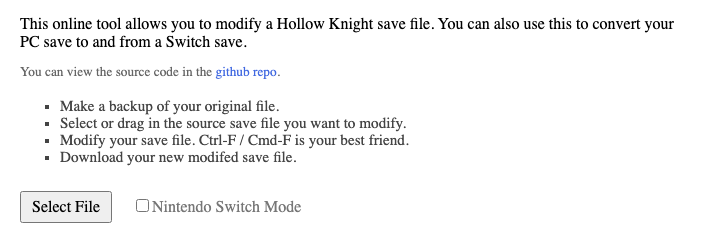
- Open the Hollow Knight save editor.
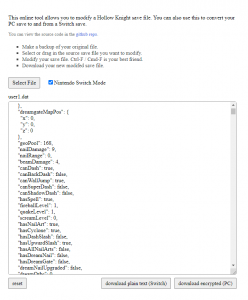
- Tick Nintendo Switch Mode, because the file comes from the Switch.
- Click Select File and choose
user1.dat. The editor shows the save’s data as text. - Click download encrypted (PC). You get a
user1.datthat the PC version can read.
Step 3: copy it to the PC save folder
- Close Hollow Knight.
- Open this folder (paste it in the File Explorer address bar):
%USERPROFILE%\AppData\LocalLow\Team Cherry\Hollow Knight- Back up the
user1.datthat’s already there, if any, then replace it with the converted one. To put the save in another slot, name ituser2.dat,user3.datoruser4.dat.
Start the game: your Switch save appears on the profile screen.
From PC to Switch
- Close the game and copy
user1.datfrom the PC folder above. - Open the online editor without ticking Nintendo Switch Mode, because this file is encrypted.
- Choose the file with Select File and click download plain text (Switch). The file downloads as
plain.dat: rename it touser1.dat. - Copy it into a JKSV backup folder of Hollow Knight on the SD card, replacing the
user1.datthat’s there. - In JKSV, choose Hollow Knight, select that backup and restore it.
Open the game on the Switch and carry on with your PC progress.
If something goes wrong
- The editor shows an error or unreadable text: Nintendo Switch Mode is set the wrong way. Tick it for files from the Switch and untick it for files from the PC.
- The game on PC doesn’t show the save: check the file name (
user1.dat, notuser1 (1).dat) and that it’s in the folder above. If Steam warns about a cloud conflict, keep the files on this computer. - JKSV doesn’t restore the save on the Switch: the file must be called
user1.dat, notplain.dat, and be inside a Hollow Knight backup folder created by JKSV.
Good to know
- The editor by bloodorca is an independent, open-source project (source code), not affiliated with Team Cherry.
- The same editor can modify the save (Geo, abilities, charms). Change things only if you know what they do, and keep a backup.
Frequently asked questions
Do I need a modded Switch?
Yes. The Switch doesn't let you copy saves to the SD card, so you need JKSV, a homebrew app that only runs on a console with custom firmware. This guide doesn't cover how to install it.
Which file is my save?
user1.dat is the first save slot on the profile screen, user2.dat the second and so on. shared.dat holds settings and doesn't need converting.
Does it work with the GOG or Xbox (PC) versions?
The GOG version uses the same encrypted format and the same folder as Steam. The Xbox app / Game Pass version stores its saves differently and isn't covered here.
Is the online editor safe?
It's open source on GitHub and the conversion runs in your browser; the file isn't uploaded anywhere. Keep a backup of your saves anyway.
Can I keep playing on both and sync them?
Yes, by repeating the process each time you switch. Always convert from the platform you played on last, or you'll overwrite your newest progress.
Official downloads
Always download from the official sites below.
- Hollow Knight on Steam
- Hollow Knight save editor (bloodorca) — free, open source, runs in the browser
- JKSV (releases) — save manager for Switch with custom firmware (JKSV.nro)
Related articles
Guides
Console saves on PC: every savegame conversion we've done
List of games whose console save (Xbox 360, Xbox One, PS3, PS4, Switch, Wii U, GameCube, N64) we have moved to PC, and whether it needs a MrScion tool.
· Windows
Guides
How to transfer your Shadows of the Damned Xbox 360 save to the Steam remaster
Step by step: copy your Shadows of the Damned save from the Xbox 360 to a USB drive and convert it for Hella Remastered on Steam with the free SOTD Save Tool.
· Windows
Guides
How to transfer your Marvel's Spider-Man PS4 save to Spider-Man Remastered on PC
Step by step: copy your Marvel's Spider-Man save from the PS4 to a USB drive, decrypt it with Save Wizard and carry on in Spider-Man Remastered on PC.
· Windows